By Ilane Tall · Updated September 25, 2026 · Research-based.
Reader-supported: we may earn a commission when you buy through the links on this page, at no additional cost to you. It never changes which product we recommend. Prices quoted below were correct at the time of writing and move often.
The short version
A basic dial thermostat cannot "forget" its setting, because it never stored one to begin with — it is a mechanical switch sitting at a physical position. A digital touch panel is different: its setpoint lives in the control board's memory, and what happens to that memory during a power cut is the whole question this guide answers.
Cheap digital panels sometimes come back from an outage at a factory default rather than your last setting — often the coldest position on the dial — and quietly recool wine that was never in danger. A panel with proper power-outage memory just resumes at the number you left it on.
None of this changes what happens during the outage itself. Memory only decides what the compressor targets once power returns — see what the feature does not protect against before you assume a memory-retaining panel makes a long blackout a non-event.
What "power-off memory" actually does
Strip away the marketing language and a digital wine fridge control is a small circuit board: a microcontroller, a temperature sensor, and a display, wired to the compressor and a relay. When you press the up or down arrow to set 55°F, that number is not just shown on the display — it is written to the board's memory as the target the thermostat logic should chase. The compressor cycles on and off to keep the sensor reading near that number, and it keeps doing that indefinitely, with no further input from you, until either you change the setting or the power is cut.
That last part is where the touch panel and the dial genuinely diverge. A mechanical dial thermostat has no "setting" in the electronic sense at all — it is a bimetallic switch or a simple potentiometer sitting at a physical rotational position. Cut the power and restore it, and the dial has not moved. It is still at "4" because nobody touched it. There is nothing to remember because nothing was ever stored; the position itself is the memory, and it is immune to a blackout by default.
A digital panel does not have that built-in immunity. Its setpoint is a number sitting in volatile or non-volatile memory on the board, and whether that number survives a power interruption depends entirely on how the manufacturer built the control logic. Write the setpoint to a memory type that persists without power, and the unit reboots exactly where you left it. Skip that step — or simply never account for it, because it is cheaper and simpler not to — and the board boots into whatever default value is hard-coded into its firmware, which is very often the coldest setting the unit supports, on the reasoning that erring cold is safer for the appliance than erring warm.
This is not a spec most listings state plainly, and it is genuinely difficult to verify before you own the unit — see the FAQ below for how to approach that gap honestly rather than guessing. What matters for this guide is understanding that "digital touch control" and "remembers its setting through a blackout" are two separate claims. The first is now close to standard on any wine-and-beverage refrigerator built around a glass French door and dual compartments; the second is a specific piece of firmware behavior that a touch panel makes possible but does not guarantee.
The failure mode this actually solves
The scenario that makes this worth thinking about is not a five-minute flicker. Most homes ride out a brief outage without the cabinet's interior temperature moving enough to matter — a well-sealed door and a few dozen pounds of glass and liquid inside act as thermal ballast, and the compressor simply picks up where it left off once power returns.
The scenario that matters is longer: a storm knocks out power for a day, a weekend, or longer while nobody is home to notice. Refrigeration comes back online automatically when utility power is restored — nobody has to flip a switch — and that is precisely the moment a non-memory panel does its damage. If the board's firmware resets to a hard-coded default rather than the setpoint you actually chose, and that default sits at the cold end of the range, the compressor comes back convinced its job is to chase a temperature several degrees below where the cabinet was actually running before the outage.
What that looks like in practice: you set a dual-zone unit to 55°F for reds and 45°F for whites. A three-day outage hits while you are traveling. Power returns, and a memory-less board reboots at its factory default — on many units, the coldest position either zone supports. The compressor now runs hard toward a target you never chose, for wine that survived the outage itself just fine and did not need to be re-chilled at all. You come home to a unit working overtime and, depending on the model, a control panel showing a number you never set.
The wine itself is rarely harmed by this — a swing toward colder is far less damaging than a swing toward warm, and it is nothing like the slow damage of a fridge that never regains power. The real cost is quieter: energy spent cooling to a setpoint nobody chose, a compressor running a harder duty cycle than necessary, and — if the reset default happens to land on the warm end on a particular model instead — the one scenario that actually matters, wine sitting well above 55°F for days without anyone knowing the setting had drifted. Either direction, the point is the same: a unit that comes back from an outage at the number you originally set removes a variable you should not have to think about every time the power blinks.
Touch panel vs. physical dial: the honest trade
None of this is an argument that touch panels are simply better. They solve a real problem and introduce a different one, and a buying guide that only tells you the upside is not being straight with you.
Physical dial
Coarse, usually numbered 1 through 7 or "min" to "max" rather than in degrees. Setting it precisely to 55°F is guesswork and a thermometer. But it cannot glitch, cannot lock up, and needs no memory because the position never changes on its own.
Digital touch panel
Set the exact degree, see the exact number, adjust in single-degree steps. Precise — and dependent on working electronics and firmware behaving correctly, including through the exact power event this guide is about.
The precision case for touch control is straightforward. A dial gets you into the right neighborhood; a digital display tells you whether the cabinet is actually holding 55°F or quietly running at 52°F, and lets you correct it in one-degree increments instead of nudging a knob and waiting an hour to see what happened. For anyone running a dual-zone unit with a genuinely different target for reds and whites, that precision is close to necessary — dialing two separate mechanical thermostats to a specific, matching pair of temperatures is far harder than it sounds.
The downside is just as real, and it is a documented complaint about touch-panel consumer electronics as a category, not a knock on any specific product: capacitive touch surfaces are sensitive to moisture, condensation, and the general humidity that a refrigerated cabinet produces at its own door seal, and a panel that stops registering presses is one of the most common ways this class of appliance fails. When a dial stops working, it usually means the mechanism broke and stuck at whatever number it was on — the fridge keeps running at that setting. When a touch panel stops responding, you may lose the ability to change the setpoint at all, while the fridge keeps running at whatever it was doing when the panel died. That is a meaningfully different failure mode, and it is worth knowing before you buy a unit with no manual override.
None of that makes a dial the better choice for most buyers — the ability to see and set an exact number is worth the trade for most people, and it is the only practical way to run two zones. It does mean a touch panel is one more component that can fail, on top of the compressor and the seals every wine fridge already depends on.
Reading two zones correctly on one touch panel
A dual-zone cabinet with a single touch strip has to fit two independent setpoints onto one small display, and the interface pattern nearly every manufacturer converges on is the same: a zone-select button that toggles which compartment the up/down arrows currently control, paired with a display that shows only one number at a time — or two numbers stacked, with the active zone highlighted or blinking.
The mistake this invites is simple and common: pressing the arrows without first confirming which zone is selected, and adjusting the wrong compartment. Set out to warm the lower zone by two degrees, miss the zone indicator, and you have just changed the upper zone instead — and because the display briefly shows the new number regardless of which zone it belongs to, the error is easy not to notice until the wrong wine is running at the wrong temperature days later.
The habit worth building is the same every time: press the zone-select control first, wait for the display or an indicator light to confirm which compartment is now active, and only then use the arrows. On the units in this guide, that means confirming upper versus lower (or left versus right, on a side-by-side French-door layout) before touching anything else. If you cannot immediately tell which zone is selected from the panel alone, treat that as a real usability shortcoming rather than a minor annoyance — it is the direct cause of the "why is my white wine warm" complaint that shows up around dual-zone units generally.
If you have not settled the single-versus-dual-zone question yet, that decision comes before the panel question — our single-zone guide covers when one setpoint is genuinely the better and simpler buy.
The picks
All three of today's picks are 24-inch dual-zone wine-and-beverage refrigerators, controlled through a digital panel rather than a mechanical dial — standard for a combination unit at this size and price, and exactly why the memory question in this guide applies to them rather than to a $120 single-dial mini fridge. We have not independently verified how each unit's firmware behaves through a multi-day power outage specifically — that is a granular engineering detail manufacturers rarely publish — so treat the checklist in the FAQ below as the way to confirm it before you buy, not as something this guide can promise you from the spec sheet alone.
01Most bottle-forward capacity
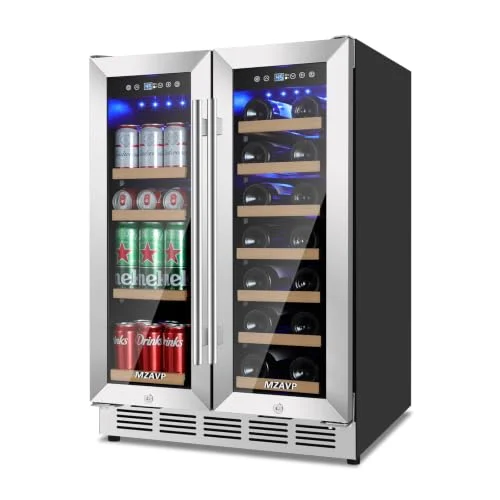
MZAVP 24" Dual Zone with French Door
20 bottles, 88 cans, built-in or freestanding
20 bottles + 88 cans·Dual zone·4.65 cu.ft·Built-in or freestanding
A 24-inch French-door cabinet split between a bottle side and a can side, in a 4.65 cubic foot interior, rated for either a built-in or a freestanding installation. Twenty bottles is a modest wine allocation for a unit this size — most of the volume goes to the 88-can capacity — which makes this the pick for a household where beverages, not a growing bottle collection, are the daily draw. The glass French door is a real practical plus with a dual-zone touch panel: you can see both zone indicators without opening the cabinet and letting either side's temperature drift.
Buy this one if cans, not bottles, are the actual daily traffic through the door.
02Slightly more bottle room
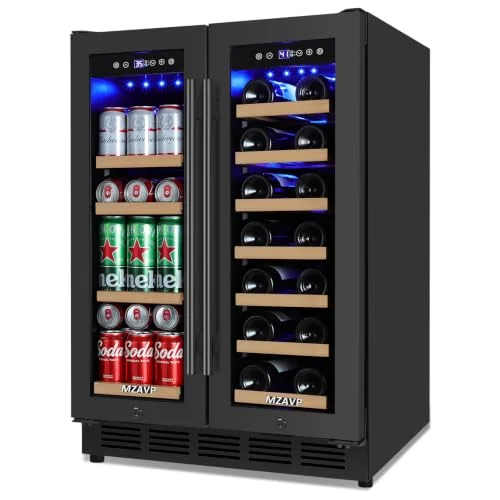
MZAVP 24" Dual Zone, Black
21 bottles, 88 cans, built-in or freestanding
21 bottles + 88 cans·Dual zone·Black finish·Built-in or freestanding
The sibling unit to the pick above, from the same maker, in a black finish and with one extra bottle of rack space at the same 88-can beverage capacity. Same French-door layout, same built-in-or-freestanding flexibility, same dual-zone premise: one compartment for reds at cellar temperature, one for drinks at drinking temperature. At $569.99 it runs about $55 above the white-panel version for a finish change and a single extra bottle slot — worth it only if the black cabinet is what the kitchen actually needs to match.
Nearly identical to the pick above; choose on finish and the extra bottle, not on features.
03Most wine-forward of the three
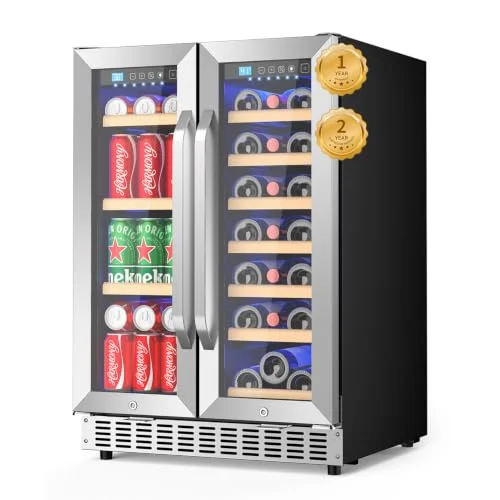
EORICE 24" Dual Zone Under Counter
21 bottles, 60 cans, blue LED interior lighting
21 bottles + 60 cans·Dual zone·4.2 cu.ft·Under-counter rated
The most wine-weighted of the three: 21 bottles against 60 cans, versus roughly the same bottle count but far more can space on the two MZAVP units above. In a 4.2 cubic foot cabinet rated for under-counter installation, this is the pick if the appliance is genuinely going into a cabinet run rather than standing freely against a wall — confirm the clearance and venting requirements on the listing before you commit it to a built-in opening. The interior uses blue LED lighting behind the glass door, which is a cosmetic detail worth knowing before you buy if you were picturing a warmer amber cellar look.
The bottle-heavier option, and the one built with a cabinet installation in mind.
All three sit in the same 20-to-21-bottle range — genuinely modest capacity once you allow for the usual gap between advertised and realistic bottle counts, so if wine volume rather than beverage convenience is your priority, it is worth comparing them against a dedicated wine-only cabinet in our small-capacity guide before deciding a combination unit is the right shape of appliance at all.
What this feature does not protect against
This is the part worth being blunt about, because "power-outage memory" is an easy phrase to over-trust: it protects the setpoint, not the temperature. A panel that remembers 55°F does nothing to keep the cabinet near 55°F while the power is actually out. The compressor is off. No refrigeration technology, however good the touch panel, cools anything without electricity flowing to it.
What actually determines how long wine stays safe during a real outage is insulation and thermal mass — the same physics that make a full fridge hold its temperature longer than an empty one, and a well-insulated built-in cabinet outlast a thin-walled freestanding unit standing in a warm room. None of that has anything to do with the control panel. A unit with excellent memory retention and mediocre insulation will still warm up faster during a long outage than a unit with no memory at all and better insulation — memory only decides what happens the moment power comes back, not what happens in between.
Put plainly: power-outage memory is a convenience and an energy-waste preventer, not a safety feature for the outage itself. It solves the "why is my compressor working overtime for no reason" problem. It does not solve the "the power has been out for four days and nobody has checked the wine" problem — nothing sold as a wine fridge feature does. If outages longer than a few hours are a real risk where you live, the panel's memory is the smaller half of the plan; the other half is checking on the cabinet, the same way you would check on anything else in the house that depends on the grid staying up. If you are ever restarting a unit after it has sat without power for a while, do it the way our restart guide lays out — giving the compressor and refrigerant time to settle before you load bottles back in matters more than which number is on the display.
How we compared
What we did
Listings, published specs, and general control-board behavior
We compared the published capacity, dimensions, dual-zone configuration, installation type and current Amazon price for each unit against what the listing actually states, and explained the general engineering behavior of digital control boards and mechanical dials as a category — the mechanism that makes the power-memory question meaningful in the first place.
What we didn't
We don't run a testing lab
We do not physically test these units, we do not own them, and we do not cut power to a unit in a lab to time how it reboots — we don't run a testing lab, staged or otherwise. Where a specific behavior like power-memory retention is not published for a given unit, we say so and tell you how to verify it yourself rather than guessing on your behalf.
Frequently asked questions
How do I actually check whether a specific wine fridge has power-outage memory?
Manufacturers rarely state this in the bullet points, so the reliable way is to read the full manual (most brands publish a PDF on their site or in the Amazon listing's product information section) and look for language about behavior "after a power interruption" or "power failure recovery." If the manual is silent on it, the second-best option is to ask the seller directly before you buy, in writing, so you have a record if the unit resets unexpectedly. Absent either, the safe assumption is that a budget unit may reset to a default rather than remember your setting — plan accordingly rather than assuming the best case.
Does having a digital display automatically mean a wine fridge has this feature?
No, and this is the mistake worth avoiding. A digital display only confirms that the setpoint is stored electronically rather than mechanically — it says nothing about whether that stored value survives a power cut. A digital panel is a prerequisite for power-outage memory, not proof of it; the two are separate claims, covered above in what power-off memory actually does.
What actually happens inside the cabinet during a long power outage?
The compressor stops entirely and the interior temperature drifts toward room temperature at a rate set by the cabinet's insulation, how full it is, and how warm the room gets — not by anything the control panel does. See what this feature does not protect against for why memory retention has no bearing on this part of the problem.
Is it safe to assume a dual-zone touch panel is showing the zone I think I'm adjusting?
Not without confirming it first. The interface pattern on nearly every dual-zone touch panel requires selecting which zone is active before the up/down arrows do anything to it, and the display briefly shows the new number regardless of which zone actually changed. Confirm the zone indicator before adjusting — see reading two zones correctly for the habit worth building.
Written by Ilane Tall. Research-based comparisons of published specifications, current prices and verified owner reviews — we do not physically test these units and we do not publish invented scores.